
Neighborbrite Landscape Design
Neighborbrite Inc.House & Home
4.622.00 Reviews
- Version
- 2.4.1
- Installs
- 10.00K
- Age Rating
- Everyone
Screenshots
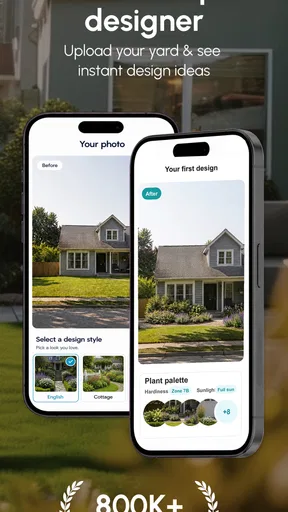
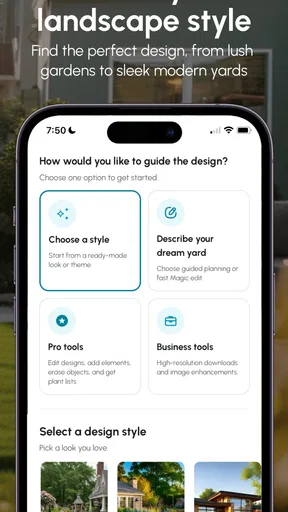
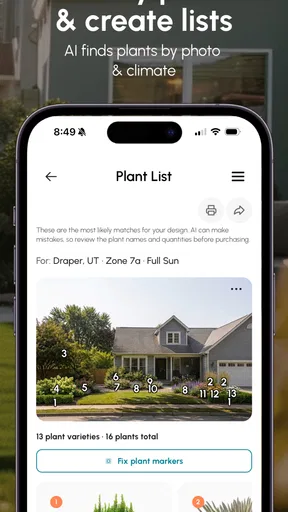
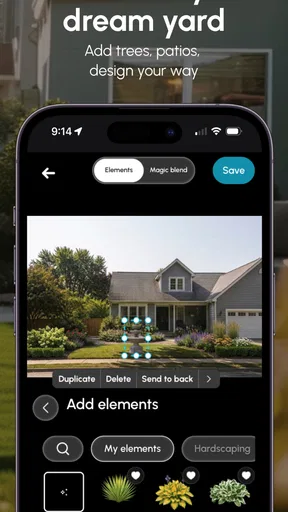
Our Review of Neighborbrite Landscape Design
 Analysis by Appyee
I found Neighborbrite Landscape Design most useful when I treated it as a visual starting point rather than a complete garden plan. It is a free House & Home app from Neighborbrite Inc. that uses artificial intelligence to help imagine changes to gardens, yards, and other outdoor spaces. That distinction matters: the app can help you move from “this area feels unfinished” to a clearer idea of what might look good, but it should not replace measurements, local growing knowledge, or advice from a landscape professional.
For a first-time user, the appeal is easy to understand. Outdoor projects are difficult to picture before anything is planted, paved, painted, or moved. A normal search gives you isolated photos, while a garden center gives you physical products without showing how they might work together at home. This app sits between those two approaches by putting the design conversation around your own outdoor space. In my experience, that makes it especially approachable for someone who wants ideas before spending money.
What Neighborbrite Landscape Design feels like in everyday use
The first thing to expect is a visual experiment. You bring the app a view of the space you are considering, then use the generated design as a way to compare directions. The useful question is not “Will this image become my finished yard?” but “Which parts of this idea are worth investigating in real life?” That mindset produces much better results and avoids disappointment.
I can see the app helping with several common situations. Perhaps a small front garden looks bare, a patio needs more character, or a side passage is being ignored because it is hard to imagine what belongs there. Instead of collecting unrelated inspiration images, you can use an image of the actual area as the reference point. That makes the discussion more practical when you are deciding whether you prefer a softer planting style, a cleaner modern look, or a more relaxed outdoor setting.
The app is also useful before a conversation with another person. If you share a home with someone who has different tastes, a visual proposal can turn vague preferences into something concrete. You may discover that one person likes the planting idea but dislikes the hard surfaces, or that both of you prefer the same overall style after seeing it applied to your own yard. That kind of comparison is more productive than arguing from memory.
At the same time, artificial intelligence can make attractive suggestions that are not automatically practical. A generated arrangement may ignore the direction of sunlight, drainage, frost, mature plant size, access routes, pets, children, or the amount of maintenance you are willing to do. I would use the image to choose a direction, then check every important decision separately.
The app has a 4.6 average from around 200 ratings, with more than 20 written reviews and over 10 thousand installs. Those figures suggest that it has attracted a real group of early users, although I would still approach it as a developing tool rather than a replacement for established professional design software. It is rated for Everyone, which fits its straightforward home-improvement purpose.
Getting through the first setup without overthinking it
My advice is to begin with one manageable area instead of trying to redesign the whole property. Choose a space with a clear problem: an empty corner, a tired entrance, or a plain seating area. A focused starting point gives the app a better chance of producing an idea you can evaluate, and it makes the first session feel less like a large renovation project.
Before using an image, take a moment to choose a useful viewpoint. Stand far enough away to show the boundaries of the area, but not so far away that the important details disappear. Try to include the ground, nearby walls, fences, steps, and any permanent objects that will remain. A close-up of plants may look attractive, but it gives less context for a layout decision.
Lighting is another practical detail. A bright, reasonably clear image is easier to judge than a dark photograph taken at an awkward angle. You do not need a professional camera, but avoid hiding the area behind furniture, vehicles, or people. If the space is photographed from a corner, remember that the perspective can make it appear deeper or wider than it really is.
Once the app is installed, I would keep the first session deliberately simple. Explore the main design flow, look at how your outdoor image is handled, and resist the temptation to chase a perfect result immediately. The first goal is to understand the relationship between your original space and the proposed redesign. That understanding is more valuable than producing a dramatic picture in the first few minutes.
The app is free to install, while in-app purchases are listed from $24.99 to $149.99 per item. That makes it sensible to explore the basic experience before committing to anything paid. I would also decide in advance what you want from the session: a broad style direction, ideas for a difficult corner, or a visual aid for a future contractor conversation. A clear purpose helps you judge whether the result is actually useful.
The first meaningful success: turning one image into a decision
A successful first action is not simply generating an attractive landscape. It is finding one change that you could realistically investigate. For example, if the app suggests a more welcoming entrance, focus on the underlying idea: perhaps the path needs stronger definition, the planting needs height variation, or the doorway needs a clearer visual frame. You can then separate the useful design principle from decorative details that may not suit your property.
I recommend making a short note beside each idea you like. Record what attracts you, what might be difficult, and what needs checking outdoors. This simple habit prevents the common mistake of remembering only the mood of an image. A design may feel calm because of its colors, balanced because of its structure, or spacious because of the camera angle. Naming the reason helps you recreate the effect more intelligently.
One non-obvious advantage of working from your own space is that it exposes awkward constraints early. A narrow gate, a utility cover, a retaining edge, or a frequently used walkway can change the whole decision. When an idea is placed over the actual setting, those constraints become part of the conversation instead of being forgotten in a collection of inspirational pictures.
For a realistic everyday example, imagine coming home after work and noticing that the front area looks unfinished but not knowing where to start. You could photograph the entrance, test a few broad visual directions, and then choose one small project for the weekend: improving the border, adding a more deliberate transition near the door, or researching plants with a similar shape. The app does not complete that project for you, but it can reduce the uncertainty that keeps many small improvements from starting.
Another useful workflow is to compare ideas by maintenance rather than appearance alone. Ask yourself which version would require frequent trimming, regular watering, seasonal cleanup, or careful protection from foot traffic. A lush design may be appealing on screen but unsuitable if you travel often. A simpler concept may be less dramatic and much more successful over several years.
Where first-time users can become confused
The biggest source of confusion is treating an AI-generated visual as a measured plan. Unless you independently verify dimensions, spacing, materials, and plant suitability, the image should remain conceptual. I would not use it to order exact quantities, position drainage, estimate construction costs, or assume that a plant will thrive in a particular location.
Scale can be especially misleading. A shrub may appear small beside a wall but eventually become large enough to block a window. A seating area may look comfortable while leaving too little room to walk around it. A border can seem generous in a picture and be too narrow for the plants you want. Before acting, measure the relevant space with ordinary tools and compare the proposed arrangement against those measurements.
Plant names and visual appearances also need separate checking. If the app suggests a particular look, search for plants that match your climate, soil, light conditions, and maintenance preferences rather than copying an attractive shape blindly. Local nurseries and garden professionals are better sources for questions about hardiness, invasiveness, watering, and mature size.
Another point worth remembering is that the quality of a design idea depends partly on the reference image. If the photograph hides the boundaries or includes unusual shadows, the result may feel disconnected from what you see in person. When an output seems strange, I would first retake the image from a clearer angle instead of concluding that the entire concept is unusable.
There is also a practical cost question. Because the app includes purchases that can reach $149.99 per item, I would not assume that every useful workflow is included at no cost. Start by learning what the free experience can do, then decide whether a paid option solves a specific problem for you. If you only want occasional inspiration, a purchase may be difficult to justify. If you are actively planning a substantial outdoor change, the value depends on how much uncertainty it removes.
The current version is 2.4.1 and it requires Android 7.0 or later. That makes checking device compatibility worthwhile before planning a session, particularly if you are using an older phone or tablet. On a supported device, I would still keep original photos and personal notes outside the app so that your planning process does not depend on one place.
How it compares with familiar alternatives
The usual alternative is browsing image searches, social feeds, or garden magazines. Those sources are excellent for discovering styles, but they often show properties with different proportions, climates, and budgets. Neighborbrite Landscape Design has a more personal advantage because the design conversation begins with your own outdoor setting. It is less useful for broad research into plant care, but more useful for imagining how a direction might relate to your home.
A second alternative is drawing a plan by hand. Sketching remains better when you need accurate boundaries, dimensions, circulation, or a record of existing features. It forces you to think about space honestly. The app is faster for exploring appearance, while paper or a measured digital plan is stronger for translating that appearance into a buildable arrangement. I would use both rather than choosing one exclusively.
Professional landscape software and a designer offer more control and accountability. They are the better choice for complex grading, drainage, retaining structures, irrigation, lighting plans, or projects with significant construction risk. The app makes more sense for early-stage exploration, smaller improvements, and homeowners who want to arrive at a professional consultation with clearer preferences.
Garden-center advice has a different strength. A knowledgeable local expert can recommend plants that suit your conditions and explain seasonal care. The app can help you picture the overall mood, but it cannot replace that local knowledge. If you are deciding between several plants or materials, use the visual concept as a question to bring to the nursery rather than as the final answer.
Who will get the most from it, and who should skip it
I would recommend this app to a first-time homeowner, a renter who wants reversible ideas, or anyone who struggles to imagine outdoor changes from words alone. It is also a good fit for couples and families who need a shared visual reference before making decisions. People planning a modest refresh may find it particularly helpful because it can turn an intimidating blank space into a few manageable possibilities.
It is less suitable for someone who already has a measured planting plan and needs technical documentation. I would also skip it as the main planning tool if your project involves structural work, serious drainage issues, accessibility requirements, or a large budget that leaves little room for mistakes. In those cases, accurate site information and professional review matter more than visual experimentation.
Users who dislike interpreting approximate ideas may find the experience frustrating. The app rewards curiosity and judgment: you need to ask what is realistic, what is attractive only because of the presentation, and what should be verified elsewhere. If you want a shopping list, exact quantities, or guaranteed plant recommendations, this is not the right kind of tool.
A sensible next step after the first design
Once you have a direction you like, stop generating and begin checking. Measure the area, note the hours of sun, identify drainage concerns, and list the features that cannot move. Then divide the idea into phases. A first phase might address the entrance or seating zone, while planting and decorative details wait until you understand how the space is used.
I would also create a small “keep, change, verify” list. Keep the visual qualities that genuinely appeal to you, change anything that conflicts with access or maintenance, and verify every technical detail with local sources. This is one of the best ways to prevent an AI image from dictating a project that does not fit your life.
Neighborbrite Inc. has positioned this as a House & Home app rather than a specialist drafting package, and that is the right way to judge it. Its strongest role is helping ordinary homeowners begin. The free entry point lowers the barrier to experimentation, while the purchase range means you should examine the value of any upgrade carefully instead of assuming it is necessary.
After using it, my honest view is that Neighborbrite Landscape Design is most valuable as a confidence-building design companion. It can give you a visual language for an outdoor space, reveal preferences you had not articulated, and make a conversation with a partner, nursery, or professional more concrete. Its limitations become manageable when you treat every result as a proposal that still needs measurement and local knowledge.
If you want inspiration tied to your own yard and are comfortable making the final practical judgments yourself, I think it is worth trying. Start with one photograph, one problem, and one realistic improvement. That small workflow gives you the clearest path from installation to a useful result without confusing an appealing preview with a finished landscape plan.
Verdict
Strengths of Neighborbrite Landscape Design
- Easy-to-use tools for planning garden layouts and outdoor spaces.
- Helpful visual ideas make it easier to explore different landscaping styles.
- Suitable for homeowners without professional design experience.
- Can inspire plant, patio, lighting, and decoration choices.
- Useful for comparing potential designs before starting outdoor work.
Limitations of Neighborbrite Landscape Design
- Some design features may require a subscription or in-app purchases.
- Plant recommendations may not fully match every local climate or soil type.
- Large or detailed projects can take time to arrange accurately.
- The final visualizations may differ from the real appearance of materials.
- Requires access to photos or device features for the best planning experience.
Similar Picks in This Category
View All
Universal TV Remote Control
CodeMatics Media Solutions3.9

AlfredCamera Home Security app
Alfred Systems Inc.4.7

Planner 5D: AI Home Design
Planner 5D4.5

Universal Tv Remote-Cast to TV
One Music Player4.1

Zillow: Homes for Sale & Rent
Zillow Group4.8

99acres Buy/Rent/Sell Property
infoedge.com4.3
Frequently Asked Questions
What is Neighborbrite Landscape Design?
Neighborbrite Landscape Design is a landscaping and outdoor design app that helps you visualize ideas for gardens, yards, patios, and other exterior spaces. You can explore design concepts, experiment with different styles, and use inspiration from other projects before making real changes to your property. It is mainly intended as a planning and inspiration tool rather than a replacement for professional landscape design services.
How does Neighborbrite create landscape design ideas?
The app typically uses photos, project details, and selected preferences to generate or present outdoor design suggestions. After providing an image or describing the space, you can review possible arrangements, landscaping styles, plants, and decorative elements. Results may vary depending on image quality, location, available space, and the information supplied, so generated concepts should be treated as visual references rather than exact construction plans.
Is Neighborbrite Landscape Design free to use?
Neighborbrite may offer free access to some features, examples, or basic design exploration, while additional tools, generations, downloads, or premium content can require payment. Availability and pricing may change according to the platform, subscription plan, or promotional offer. Before confirming a purchase, check the app store listing and in-app payment screen carefully, including renewal terms and cancellation instructions.
Can I use Neighborbrite designs to plan a real garden or yard renovation?
Yes, the app can be useful during the early planning stage of a garden or yard renovation because it helps you compare visual directions and communicate ideas. However, the designs may not account for drainage, soil conditions, sunlight, local climate, property boundaries, building regulations, irrigation, or plant safety. Consult a qualified landscaper or local professional before beginning major work.
What should I know about privacy when uploading photos?
If you upload photographs of your home, garden, or surrounding property, review the app’s privacy policy and permissions before using the service. Images may be processed to provide design results, and photographs can reveal personal details such as your address, entrances, vehicles, or neighboring properties. Avoid including sensitive information and only grant camera or photo-library access when it is necessary.
